
How updates work
Signed releases are built, tested, approved with 2FA, published, and checked again at every step before anything installs — and nothing installs until an admin says so.
SENTRA ships software as signed releases. No SENTRA system installs code that SENTRA has not built, tested, approved and signed.
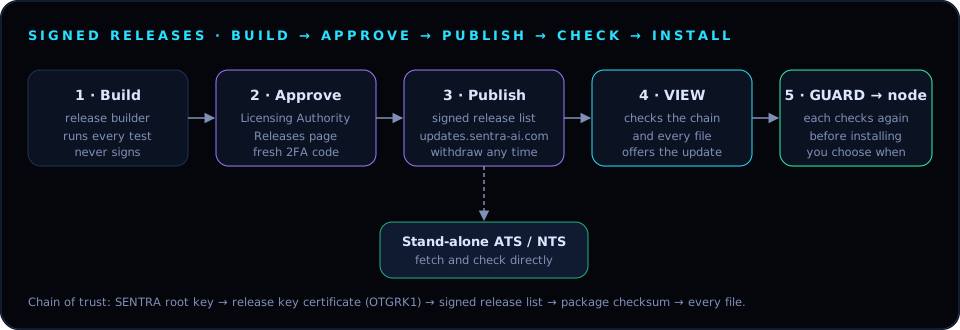
The release path#
- Build. The release builder keeps a clean copy of each product. When a new version is ready, it runs the product's full test suite and prepares a candidate. The builder never signs anything.
- Approve. A SENTRA approver opens Releases in the Licensing Authority, reviews the version, what's new and the test results, and clicks Approve & publish with a fresh two-factor code. With four eyes on, a second approver is needed.
- Publish. The Licensing Authority signs the product's release list with the release key and publishes it on
updates.sentra-ai.com. A bad release can be withdrawn: systems then never offer or install it. - Check and offer. VIEW and stand-alone ATS and NTS look for new releases periodically (and on Check now). Each release is checked end to end — SENTRA root key → release key certificate → signed release list → package → every file — and then offered in the console with its release notes and expected downtime.
- Install. Nothing installs until an admin clicks Update now or schedules a time — except where an admin has deliberately turned on automatic updates. VIEW hands releases to its GUARDs with the proof; each GUARD checks every file again, and each node checks what its GUARD hands it.
What the admin decides#
| Where | Choice |
|---|---|
| Stand-alone ATS / NTS | Update now, Schedule… or Skip this version, from the console's Updates page |
| VIEW | Install now or schedule; choose whether GUARDs follow automatically |
| GUARD | Install releases from SENTRA VIEW automatically on or off; per-node auto or manual for firewalls |
Warning
GUARDs and nodes can be locked to signed releases only. Once every system runs a version that supports signed releases, turn this on so that nothing unsigned can ever be installed.
Rolling back#
GUARD and VIEW keep the previous release as a roll-back target, and a failed install is recorded with its reason; the running version stays in place.