
The licensing model
One root of trust, keys that work offline, authorities that license their own fleets, and protection that never stops because of a licence.
Every SENTRA licence traces back to one root of trust: the SENTRA root signing key held in the SENTRA Licensing Authority. Every product ships with the matching public key, so it can check any licence offline.
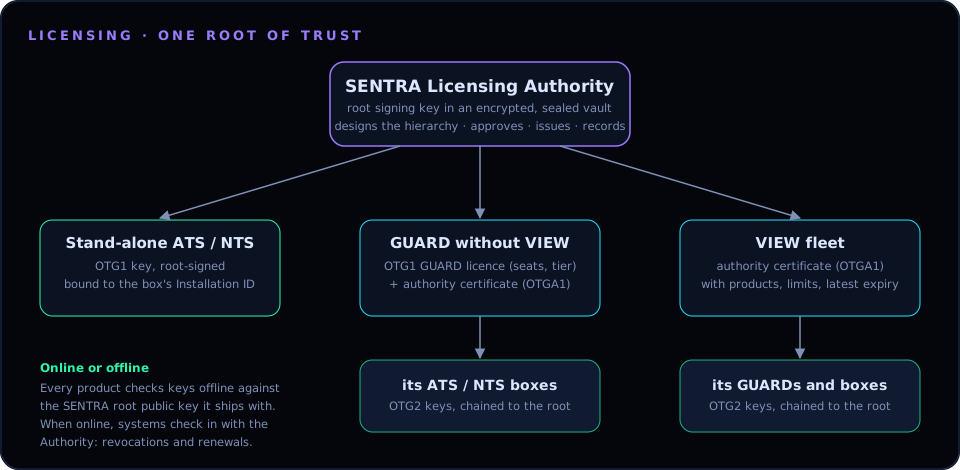
Three kinds of deployment#
| Deployment | What the Licensing Authority issues | Who licenses the boxes |
|---|---|---|
| Stand-alone ATS or NTS | A root-signed key (OTG1) bound to the box's Installation ID | The Licensing Authority directly |
| GUARD without VIEW | A GUARD licence (seats, tier) plus an authority certificate for the GUARD | The GUARD, within the limits in its certificate |
| VIEW fleet | An authority certificate for the VIEW, with the products, modules, limits and latest expiry it may grant | VIEW, automatically, from the plan designed in the Licensing Authority |
Keys issued by a GUARD or VIEW authority are OTG2 keys: they carry the authority's certificate, so a box can check the whole chain back to the SENTRA root. Authorities report every key they issue back to the Licensing Authority (online, or later as a ledger file), so the register stays complete.
What a licence covers#
| Product | Modules | Meaning |
|---|---|---|
| Web App · ATS | sentra |
The shield: inspection, policy, bans, incidents, reports, dashboard |
sentra-ids |
Network sensors & threat feeds: Suricata, Zeek, threat feeds and signature updates | |
sentra-ai |
AI analyst & Copilot: AI second opinions on traffic, AI assessments, Copilot | |
| Internet · NTS | sentra-nts |
The Network Threat Shield |
| Any | all |
Every module of that product |
A licence also has a start date, an expiry (or perpetual), and the Installation ID of the box it is for. ATS licences have no user or site count: the shield protects everything behind it.
Protection never stops#
A missing or expired licence never stops protection.
- An unlicensed module has 30 days of grace.
- After that it is restricted: inspection, rules in force, bans and the traffic path stay exactly as they are, but changes, updates and AI calls for that module are paused until a key is added.
Online check-in#
When a system can reach the internet, it checks in with the Licensing Authority — stand-alone ATS and NTS about 2 minutes after starting and then every 6 hours (or on demand with Check in now). The Authority can:
- revoke a key (the box shows it as Revoked by the SENTRA licensing authority until a later check-in lifts it), and
- hand back renewed keys, which are added automatically after the normal checks.
A failed check-in never restricts anything; offline keys keep working exactly as before.
Working disconnected#
A VIEW or GUARD certified as an authority keeps licensing its fleet while disconnected, within its limits. It syncs its ledger with the Licensing Authority when it is back online.