What SENTRA is, the products in the family, how they fit together, how licensing and updates work, what data stays with you, and how to choose a deployment.
SENTRA is mission control for a cleaner internet — AI firewalls for websites and internet lines, governed from one command centre and run on your own infrastructure.
SENTRA — Orchestrated Threat Governance (OTG) is a family of security products that inspect and block attacks at two places:
at the website — every web request is judged before it reaches the web server, and
across the whole internet line — all traffic for an organisation's IP addresses is cleaned before it reaches its network.
Both are governed from one command centre, and everything runs on your own infrastructure: your servers, your virtual machines, your data centre. SENTRA is not a cloud proxy that your traffic has to pass through on someone else's network.
Note
The motto you will see on the consoles — Autonomous Intelligence. Absolute Vigilance. — sums up the design: the shields decide on their own, in real time, and every decision is recorded.
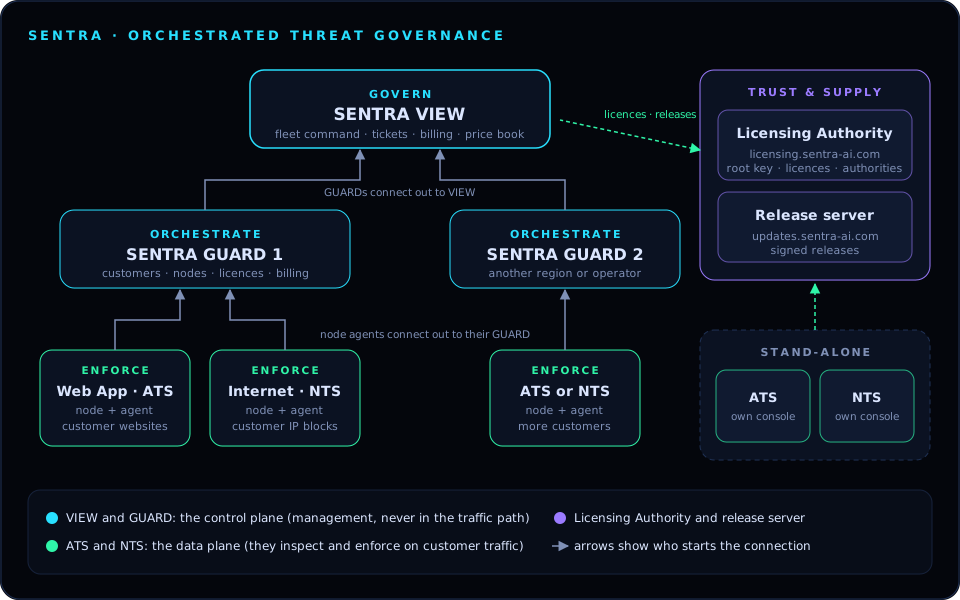
SENTRA is organised in three layers. Each layer has one job:
Govern — SENTRA VIEW. One cockpit above every GUARD: all orchestrators, nodes, customers, tickets, fleet billing, the price book and access across the fleet.
Orchestrate — SENTRA GUARD. The multi-tenant control plane: onboards customers, provisions a firewall for each on a node, watches node health and bandwidth live, moves customers between nodes, and handles licences, billing and alerts.
Enforce — the shields.
- Web App · ATS (SENTRA AI Threat Shield) — an AI web application firewall in front of websites and APIs.
- Internet · NTS (SENTRA Network Threat Shield) — a network firewall that sits inline on an internet line and protects every service behind it.
Two supporting services complete the platform:
SENTRA Licensing Authority (licensing.sentra-ai.com) — the root of trust. It holds the root signing key, designs the licence hierarchy and issues every licence.
SENTRA release server (updates.sentra-ai.com) — publishes signed software releases that every SENTRA system checks before installing.
On your infrastructure. Shields run on your servers; the control plane runs where you choose. Traffic is never sent to SENTRA.
Watch before you block. Every shield starts in Monitor mode, which shows exactly what would be stopped on your real traffic. You switch to Enforce when you are satisfied.
Fails safe. ATS has a fail-open guard that sends traffic straight to the web server if the shield stops answering; NTS bridge segments keep forwarding even if its software stops. Licensing problems never stop protection.
Works offline. Licences are checked offline against a public key built into every product. When a system is online it also checks in with the Licensing Authority for revocations and renewals.
Signed releases. No SENTRA system installs software that has not been built, tested, approved with two-factor authentication and signed by SENTRA.
Flexible. Roles and permissions are fully customisable on every product, dashboards can be arranged per user, and operators set their own plans and prices.
Everything recorded. Every decision and every admin action is written to an audit trail; on ATS and the Licensing Authority the trail is hash-chained so later tampering is detected.
The SENTRA family
What each product does, where it runs and who uses it.
Inspects every request to a website or API and stops attacks, bots and AI swarms before they reach the server
In front of the web server: on the same server or on a dedicated edge server
SENTRA Network Threat Shield
Internet · NTS
Enforce
Cleans all traffic for an organisation's IP addresses inline, before it reaches the network
On a VM or bare-metal box in the internet line
SENTRA GUARD
GUARD
Orchestrate
Multi-tenant control plane for customers, nodes, firewalls, licences, billing and alerts
A Linux server or VM (one per region or operator)
SENTRA VIEW
VIEW
Govern
Fleet command above every GUARD: fleet health, tickets, central billing, price book, access, licensing, updates
A Linux server or VM
SENTRA Licensing Authority
Licensing portal
Trust
Root of trust: designs licence hierarchies, issues and records every licence, approves and signs software releases
SENTRA's own server, licensing.sentra-ai.com
SENTRA release server
Release server
Supply
Serves signed software releases
SENTRA's own server, updates.sentra-ai.com
Tip
In the consoles, protection is always named Web App · ATS (AI Threat Shield) and Internet · NTS (Network Threat Shield), and tables use the short tags ATS and NTS. Older material may say WAF for ATS and CleanPipe / DIA for NTS — they mean the same products.
An AI web application firewall that works as an inspecting reverse proxy. Point the website's DNS at it; it terminates HTTPS, inspects each request and forwards clean traffic to the web server. Nothing changes in the application.
Five checks on every request — network, fingerprint, behaviour, AI intent and policy — scored together into one verdict: pass, challenge or block.
AI agents and swarms — genuine AI agents are verified by signature and network, impostors are caught, and swarms that spread one job across many addresses are treated as one operator.
Monitor, then Enforce — see what would be stopped on your own traffic first.
Page Shield and API Shield, response hardening (security headers, cookie flags, HSTS, banner stripping), bans, incidents, reports, and a tamper-evident audit ledger.
Optional network sensors and threat feeds (Suricata IDS, Zeek, signature updates) and an optional AI analyst & Copilot that can use a private, on-premises language model.
An inline network firewall for a whole internet line. Every port gets a role (WAN, LAN, management); a WAN and a LAN port form a segment, which runs either as a bridge (bump in the wire, no addressing change) or routed (the box is the gateway, with NAT).
Edge protection on every WAN port: allow and block lists, threat feeds, bans, flood limits, per-customer prefixes.
Stateful policy with objects, services, schedules, expiry and connection limits; NAT; DNS and HTTPS-name filtering; application control; bandwidth shaping.
Intrusion prevention (Suricata), an AI daemon that learns normal traffic and bans flood sources, VPN (WireGuard, IPsec), multi-WAN, BGP (including remotely triggered blackhole), and high availability pairs.
Commit-confirm: every change rolls itself back after 60 seconds unless confirmed, so a mistake cannot lock you out of an inline box.
The orchestrator an operator uses every day. A GUARD:
onboards customers, each with their own firewall (ATS or NTS) provisioned on a node;
registers nodes and watches them live on a radar cockpit (health, bandwidth, latency, threats);
moves customers between nodes, pushes NTS policy templates, and offers software updates to its nodes;
issues licences for its boxes (within the limits the Licensing Authority gives it), runs billing (plans, invoices, payments) and sends alerts;
manages users, roles and access — including who may sign in to each ATS and NTS box — with maker-checker approvals for sensitive actions.
A GUARD works fully on its own. When it is linked to a VIEW, VIEW becomes the boss and the GUARD keeps working (and keeps its own copy of everything) if VIEW is unavailable.
Fleet command for operators with more than one GUARD:
Fleet cockpit — every GUARD, node and customer at once, with an interactive hierarchy map.
Customers, services and nodes across all GUARDs, with the ability to create and change them on any GUARD.
Tickets with SLA (ticketing lives only in VIEW).
Central billing and the fleet price book, pushed to every GUARD.
Access across the fleet — users and roles on every GUARD and box.
Licensing — VIEW is certified as a signing authority and licenses its whole fleet automatically from the plan designed in the Licensing Authority, even while disconnected.
Software updates for itself, its GUARDs and their nodes, from the signed release server.
SENTRA's own portal at licensing.sentra-ai.com. It holds the SENTRA root signing key in an AES-256-GCM encrypted vault that is sealed after every restart, forces two-factor sign-in, and:
designs the hierarchy for each customer deployment (stand-alone ATS or NTS, GUARD with boxes, VIEW fleet) and what each level is entitled to;
issues licences and certifies VIEWs and GUARDs as signing authorities with limits;
keeps a register of every licence ever issued and sees which systems check in;
approves and signs software releases for the release server.
It is operated by SENTRA staff; customers never need access to it.
How the pieces fit together
The hierarchy VIEW → GUARD → node → ATS/NTS, who connects to whom, and what keeps working when a link is down.
SENTRA VIEW                     governs (optional)
 └── SENTRA GUARD (one or more) orchestrates
      └── node (server or VM, runs the node agent)
           └── Web App · ATS  or  Internet · NTS   enforce on customer traffic
A node is a server or VM registered on a GUARD. It runs the node agent, which receives work from the GUARD and reports health, traffic and threats back.
On each node runs one shield: ATS (for websites) or NTS (for internet lines). Each customer gets their own firewall instance.
VIEW is optional. A GUARD on its own is a complete system with customers, billing, licensing and users. VIEW adds fleet-wide command above several GUARDs.
ATS and NTS can also run stand-alone, with no GUARD at all: each has its own console, licence and updates.
A snapshot of customers, nodes, services, invoices and users; receives VIEW's changes (customers, prices, users, licences, updates)
Every 2 seconds while linked
VIEW, GUARD (as authorities)
Licensing Authority
Enrolment, and a signed report of every key they issued
On enrolment, then periodically when online
Stand-alone ATS / NTS
Licensing Authority
The licence keys it holds (check-in): receives revocations and renewals
About 2 minutes after start, then every 6 hours
VIEW, stand-alone ATS / NTS
Release server
Fetch the signed release list and packages
Periodically, and when an admin clicks Check now
GUARD
VIEW
Releases for itself and its nodes come from VIEW, with their proofs
When VIEW has a release
Note
The control plane (VIEW, GUARD, Licensing Authority) is never in the traffic path. If any of them is unreachable, the shields keep inspecting and enforcing with the last policy they received.
Every GUARD keeps running customers, nodes, billing and users on its own; changes made on a GUARD are sent to VIEW when it is back
Tickets (VIEW only); changes made on VIEW for that GUARD are queued and shown as waiting for the GUARD
A GUARD
Its nodes keep protecting traffic; boxes keep signing users in from their cached copy, and a glass-break admin on each box works only while the GUARD is unreachable
Provisioning, moves and updates for those nodes
Licensing Authority
All licences keep working offline; VIEW and GUARD authorities keep licensing their fleets within their limits
When VIEW is linked, both VIEW and each GUARD can change customers, nodes, instances and billing:
A change made in VIEW is sent to the GUARD that owns the record, which runs it through its own rules and records it as VIEW <user>.
A change made in a GUARD reaches VIEW with the next snapshot.
If the same record changed on the GUARD after the VIEW user last saw it, the GUARD refuses VIEW's change and VIEW shows the current values — nothing is silently overwritten.
Some things are owned by VIEW when it is present: the fleet price book (once VIEW has pushed it, GUARDs show prices read-only) and tickets. A GUARD can also be set to Billing from VIEW, in which case only VIEW bills that GUARD's customers.
Who SENTRA is for, and how it is deployed
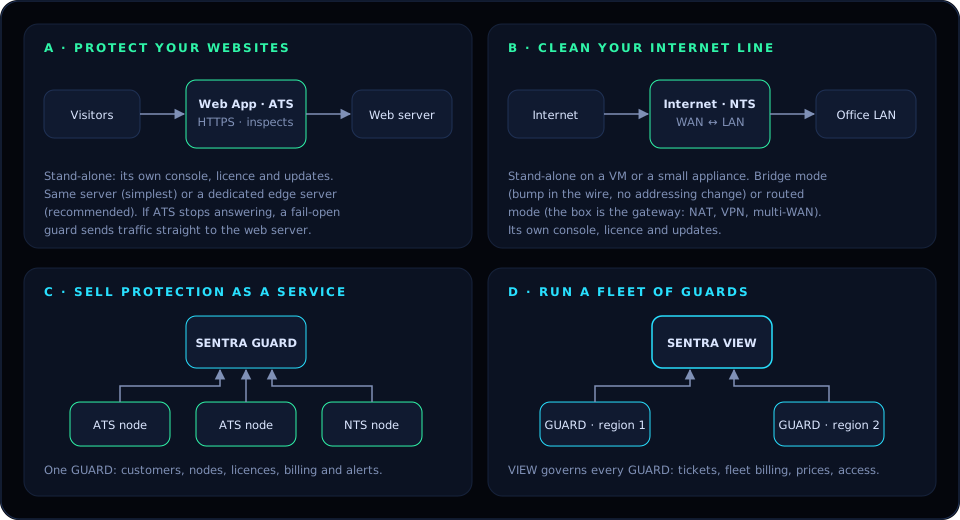
Enterprises, SMEs and homes protect themselves; telcos, ISPs, MSPs and data centres sell protection as a service. Four deployment patterns cover both.
Bump in the wire between the internet router and the network; no IP addressing changes
Add protection to an existing line without touching the network design
Routed segment
NTS is the gateway, with NAT, port forwards, VPN and multi-WAN
New sites, SMEs and homes where NTS replaces the router's firewall
On an operator network NTS can also be a routed hop for customer prefixes or sit inline at layer 2 in front of the line, as the network design requires.
Tip
Not sure? Start in Monitor mode. Both shields show what they would stop on your real traffic, so you can size and tune before anything is blocked.
The licensing model
One root of trust, keys that work offline, authorities that license their own fleets, and protection that never stops because of a licence.
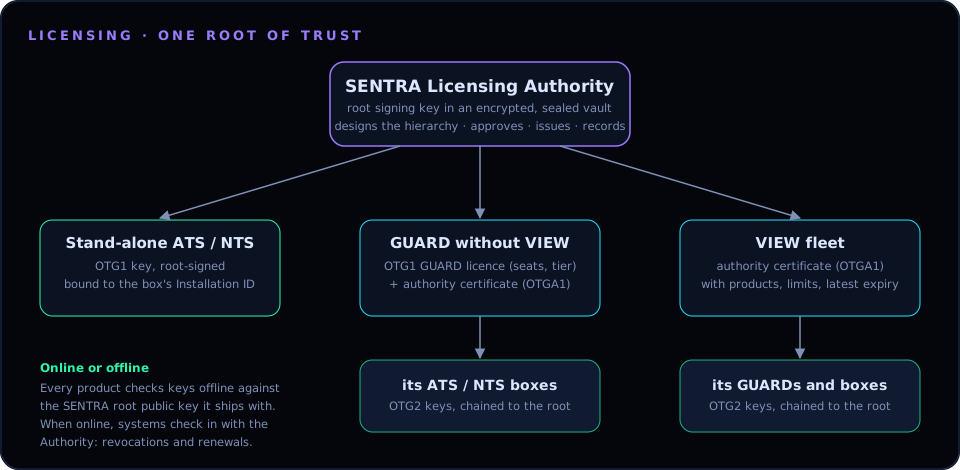
Every SENTRA licence traces back to one root of trust: the SENTRA root signing key held in the SENTRA Licensing Authority. Every product ships with the matching public key, so it can check any licence offline.
A root-signed key (OTG1) bound to the box's Installation ID
The Licensing Authority directly
GUARD without VIEW
A GUARD licence (seats, tier) plus an authority certificate for the GUARD
The GUARD, within the limits in its certificate
VIEW fleet
An authority certificate for the VIEW, with the products, modules, limits and latest expiry it may grant
VIEW, automatically, from the plan designed in the Licensing Authority
Keys issued by a GUARD or VIEW authority are OTG2 keys: they carry the authority's certificate, so a box can check the whole chain back to the SENTRA root. Authorities report every key they issue back to the Licensing Authority (online, or later as a ledger file), so the register stays complete.
AI analyst & Copilot: AI second opinions on traffic, AI assessments, Copilot
Internet · NTS
sentra-nts
The Network Threat Shield
Any
all
Every module of that product
A licence also has a start date, an expiry (or perpetual), and the Installation ID of the box it is for. ATS licences have no user or site count: the shield protects everything behind it.
A missing or expired licence never stops protection.
An unlicensed module has 30 days of grace.
After that it is restricted: inspection, rules in force, bans and the traffic path stay exactly as they are, but changes, updates and AI calls for that module are paused until a key is added.
When a system can reach the internet, it checks in with the Licensing Authority — stand-alone ATS and NTS about 2 minutes after starting and then every 6 hours (or on demand with Check in now). The Authority can:
revoke a key (the box shows it as Revoked by the SENTRA licensing authority until a later check-in lifts it), and
hand back renewed keys, which are added automatically after the normal checks.
A failed check-in never restricts anything; offline keys keep working exactly as before.
A VIEW or GUARD certified as an authority keeps licensing its fleet while disconnected, within its limits. It syncs its ledger with the Licensing Authority when it is back online.
How updates work
Signed releases are built, tested, approved with 2FA, published, and checked again at every step before anything installs — and nothing installs until an admin says so.
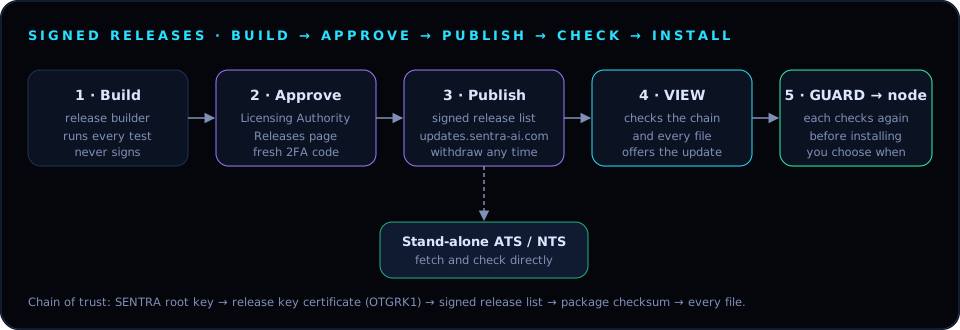
SENTRA ships software as signed releases. No SENTRA system installs code that SENTRA has not built, tested, approved and signed.
Build. The release builder keeps a clean copy of each product. When a new version is ready, it runs the product's full test suite and prepares a candidate. The builder never signs anything.
Approve. A SENTRA approver opens Releases in the Licensing Authority, reviews the version, what's new and the test results, and clicks Approve & publish with a fresh two-factor code. With four eyes on, a second approver is needed.
Publish. The Licensing Authority signs the product's release list with the release key and publishes it on updates.sentra-ai.com. A bad release can be withdrawn: systems then never offer or install it.
Check and offer. VIEW and stand-alone ATS and NTS look for new releases periodically (and on Check now). Each release is checked end to end — SENTRA root key → release key certificate → signed release list → package → every file — and then offered in the console with its release notes and expected downtime.
Install. Nothing installs until an admin clicks Update now or schedules a time — except where an admin has deliberately turned on automatic updates. VIEW hands releases to its GUARDs with the proof; each GUARD checks every file again, and each node checks what its GUARD hands it.
Update now, Schedule… or Skip this version, from the console's Updates page
VIEW
Install now or schedule; choose whether GUARDs follow automatically
GUARD
Install releases from SENTRA VIEW automatically on or off; per-node auto or manual for firewalls
Warning
GUARDs and nodes can be locked to signed releases only. Once every system runs a version that supports signed releases, turn this on so that nothing unsigned can ever be installed.
GUARD and VIEW keep the previous release as a roll-back target, and a failed install is recorded with its reason; the running version stays in place.
Your data, and what stays on-premises
Traffic is inspected where it lands. What leaves a SENTRA system, when, and how to switch it off.
SENTRA inspects traffic on the box it arrives at. Customer traffic, request contents and logs stay on your infrastructure. The shields only contact outside services that you switch on.
An encrypted backup sealed with the shield's backup key
Yes
Tip
For sovereign or air-gapped environments, run the AI analyst against a private model on your own hardware, disable external feeds you do not want, and install signed releases and licences by hand. Every product works fully offline.
The Licensing Authority stores everything — even customer names — encrypted in its vault (AES-256-GCM), and the release server only serves public, signed release files. Neither ever receives customer traffic.
Choosing a deployment
A short decision guide — which products, which placement and which licences for your situation.
Answer these questions in order.
What do you need to protect? Websites, portals and APIs → Web App · ATS. The whole internet line (mail, VPN, remote access, every server) → Internet · NTS. Both → both.
Is it for your own organisation, or for customers? Your own → stand-alone shields (patterns A and B). Customers → SENTRA GUARD with ATS and NTS nodes (pattern C).
How many GUARDs? One → GUARD on its own. Several regions, brands or data centres → add SENTRA VIEW above them (pattern D).
Where does ATS go? Trial or single small site → same server. Production → dedicated edge server.
How does NTS sit in the line? Keep the existing network design → bridge segment. NTS should be the gateway (NAT, VPN, multi-WAN) → routed segment. Two boxes for no single point of failure → an HA pair.
Which licence modules? ATS: sentra (always), sentra-ids for network sensors and threat feeds, sentra-ai for the AI analyst and Copilot. NTS: sentra-nts.
A company with a public website and an online portal
Stand-alone ATS on a dedicated edge server, sentra + sentra-ids; add sentra-ai for AI second opinions
A branch office or SME on one internet line
Stand-alone NTS in routed mode on a small appliance; bridge mode if a router must stay in place
A home or small office wanting a filtered, safe internet
Stand-alone NTS on a small appliance with DNS and HTTPS-name filtering
A data centre selling protected hosting
One GUARD with ATS nodes for hosted websites and NTS nodes for customer IP blocks
A telco with DIA customers in several regions
VIEW + one GUARD per region; NTS nodes for DIA lines, ATS nodes for customer websites; fleet price book in VIEW
A bank or government agency that must stay sovereign
Shields and control plane on its own hardware; AI analyst on a private model; licences and releases installed by hand if fully air-gapped
Tip
Whatever you choose, start every shield in Monitor mode for a few days. Review what would have been stopped, trust anything legitimate, then switch to Enforce.
 SENTRADOCUMENTATION